
Panda Print — Built for Live Sellers for Windows
Description
Panda Print — Built for Live Sellers
Keep Your Live Sales Organized Automatically
When you’re running a fast-paced live show, the last thing you want to do is stop between sales to write down usernames, item numbers, or buyer information.
Panda Print helps automate that process by monitoring your Whatnot live show and automatically printing a label when an item sells.
Instead of manually keeping track of every winning buyer, Panda Print creates an easy-to-use physical label that can stay with the item throughout your sorting and fulfillment process.
Sell faster. Stay organized. Keep your attention on your show.
What Panda Print Does
✅ Automatic Label Printing
When an auction is completed, Panda Print automatically creates and prints a label containing the buyer and item information you need to keep the sale organized.
No stopping the show to manually create labels.
✅ Real-Time Sales Tracking
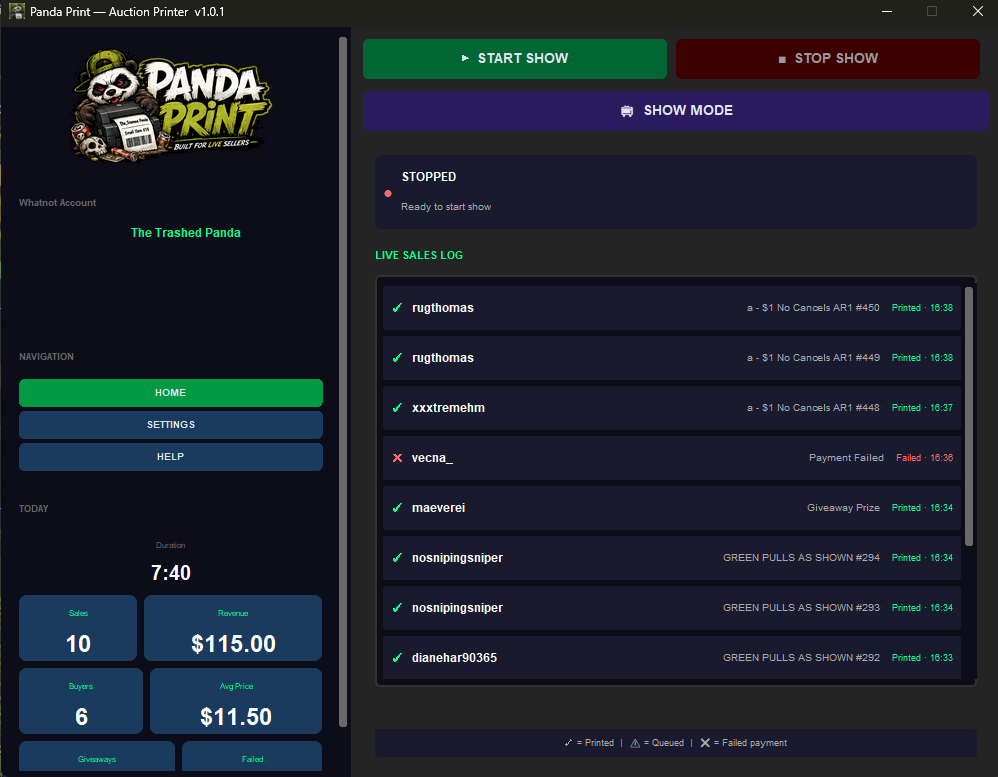
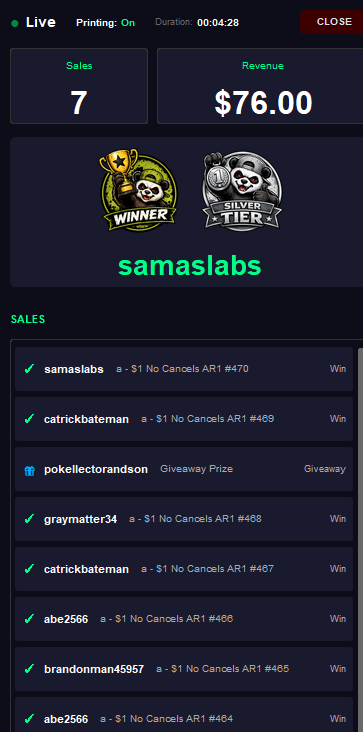
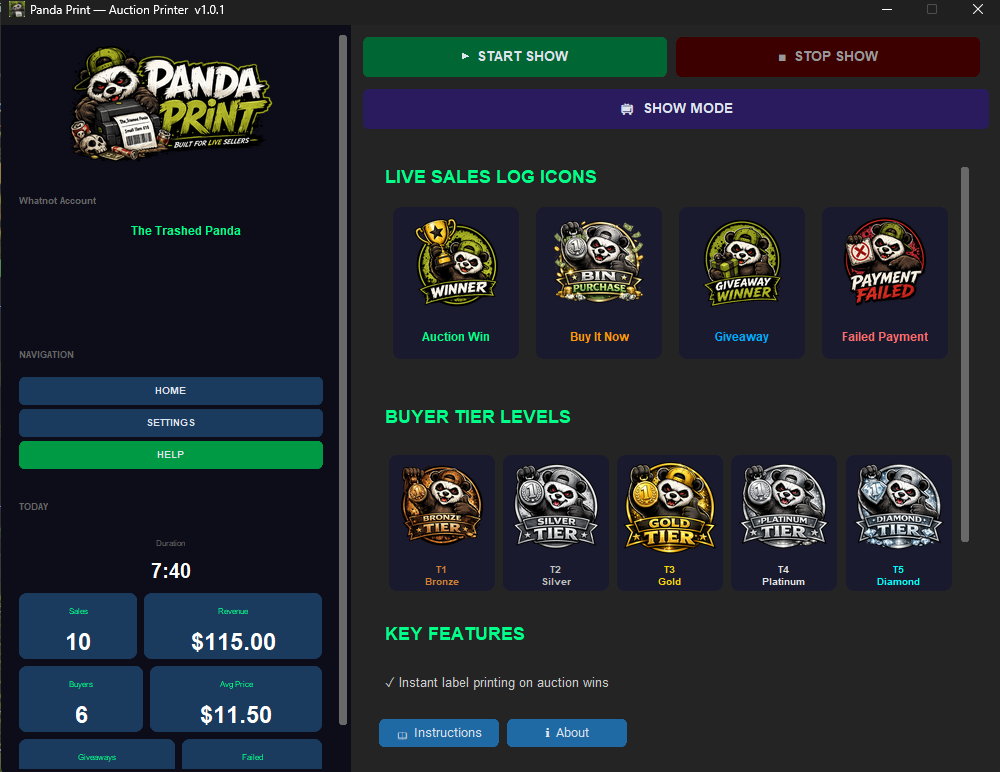
Follow your sales as they happen with a live dashboard showing buyer, item, price, and sale information.
Your sales history stays organized so you can easily review activity from your show.
✅ Buyer Box Numbering
Panda Print can automatically assign buyers a box number, making it easy to organize multiple purchases from the same buyer.
Keep a box, bin, tote, or sorting area assigned to each buyer and quickly place additional purchases with their existing items.
✅ Preset & Custom Label Sizes
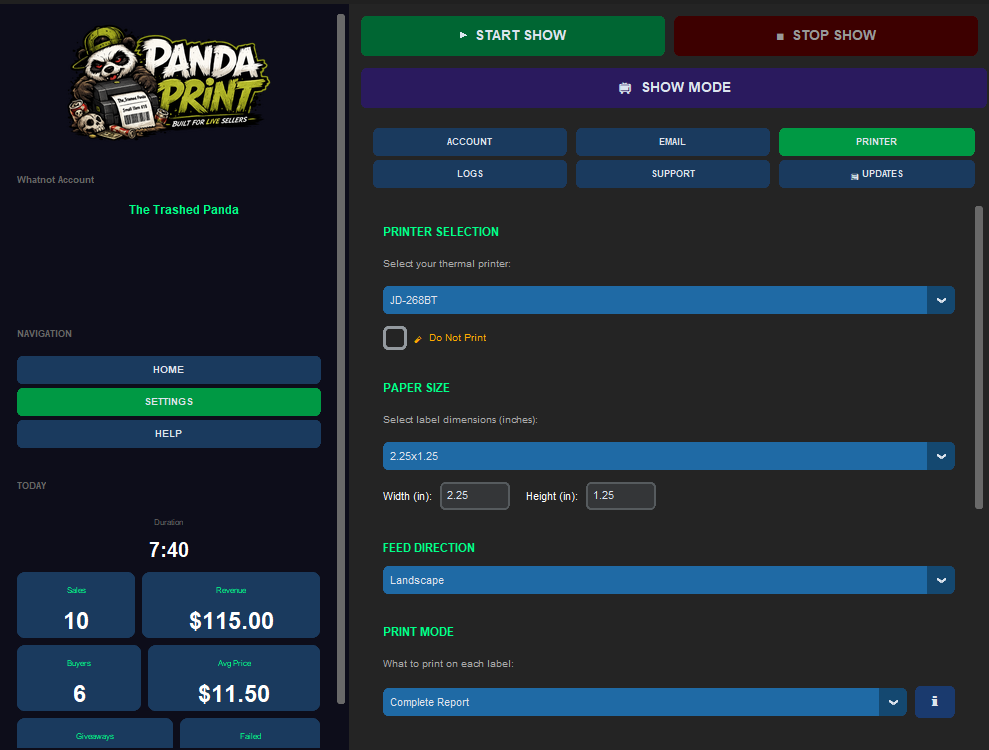
Panda Print is designed to work with thermal printers and includes preset label sizes for quick setup.
Need something different? Custom label sizes allow you to configure Panda Print to fit your preferred label dimensions and selling workflow.
✅ Automatic Buyer & Item Information
Labels can include important sale information such as:
- Whatnot username
- Item name
- Item/listing number
- Buyer box number
Item names are automatically formatted to help keep labels clean and readable.
✅ Print Queue Management
If your printer becomes temporarily unavailable, Panda Print can queue labels so they aren’t lost while you get the printer back online.
Designed for Live Sellers
Panda Print is especially useful for sellers running fast-paced shows where keeping sold items organized can quickly become difficult.
Whether you’re selling:
- Collectibles
- Trading cards
- Coins
- Clothing
- Toys
- General merchandise
- Reseller inventory
Panda Print helps create a simple workflow from auction win → printed label → organized item.
How It Works
- Install Panda Print on your Windows computer.
- Select your printer and configure your label settings.
- Configure your seller information.
- Start your Whatnot live show.
- Panda Print monitors your sales activity.
- Labels print automatically as items sell.
- Place the label with the sold item or buyer’s box.
Once configured, Panda Print is designed to stay out of your way so you can concentrate on selling.
Live Sales Dashboard
Panda Print doesn’t just print labels.
The built-in dashboard allows you to follow your show activity in real time and review important sales information as your show progresses.
Track information such as:
- Completed sales
- Buyer usernames
- Item names
- Sale prices
- Buyer box assignments
- Sale timestamps
This gives you a quick reference during and after your show without having to manually track every transaction.
Buyer Box System
For buyers making multiple purchases during the same show, Panda Print’s box numbering system can make sorting significantly easier.
For example:
Box #1 — Buyer A
Box #2 — Buyer B
Box #3 — Buyer C
When Buyer A purchases another item, their new label continues to identify their assigned box.
Instead of searching through piles of sold inventory after the show, items can be organized as they’re sold.
Label Information
Depending on your settings, Panda Print labels can display:
- Buyer Username
- Item Name
- Item / Listing Number
- Box Number
Labels are formatted for quick identification while sorting merchandise during and after your live show.
Printer & Label Compatibility
Panda Print is designed to work with thermal printers installed through Windows.
Choose from built-in preset label sizes for quick setup or create a custom label size to match your preferred labels and workflow.
Printer compatibility may vary by model and Windows driver.
System Requirements
- Operating System: Windows 10 or Windows 11 (64-bit)
- Internet: Active internet connection required
- Printer: Compatible thermal printer with a Windows print driver
- Labels: Preset and custom label sizes supported
- Whatnot Account: Active seller account
What’s Included
- ✅ Panda Print Windows desktop application
- ✅ Automatic live-sale label printing
- ✅ Preset and custom label sizes
- ✅ Real-time sales dashboard
- ✅ Buyer box numbering system
- ✅ Print queue management
- ✅ Seller verification
- ✅ Printer and label settings
- ✅ Sales reporting
- ✅ Application updates during the applicable license period
Why Use Panda Print?
Stay Focused
Spend less time manually recording sales and more time interacting with buyers and running your show.
Stay Organized
Keep sold items associated with the correct buyer from the moment they’re sold.
Reduce Manual Work
Automate one of the repetitive tasks involved with running a live selling operation.
Built for Live Sellers
Panda Print was designed specifically around the workflow of live sellers who need a fast and practical way to organize sold inventory.
Simple Setup
Install Panda Print, configure your seller and printer settings, and you’re ready to use it with your live shows.
Your settings are saved so you don’t have to reconfigure everything each time you start the application.
Panda Print
Built for Live Sellers.
Spend less time sorting out who bought what and more time running your show.
Automate your labels. Organize your sales. Keep selling.
Panda Print is an independent third-party application and is not affiliated with, endorsed by, sponsored by, or officially associated with Whatnot. Whatnot and related names and trademarks are the property of their respective owners.




Reviews
There are no reviews yet.